

How a contractor price estimator works
A rules table, a calculator and a clear label. There is no AI. Your approved rules sit in one file, and the same answers always give the same range.
You can set up your own rules in the estimator builder. It runs in your browser and gives you the embed code.
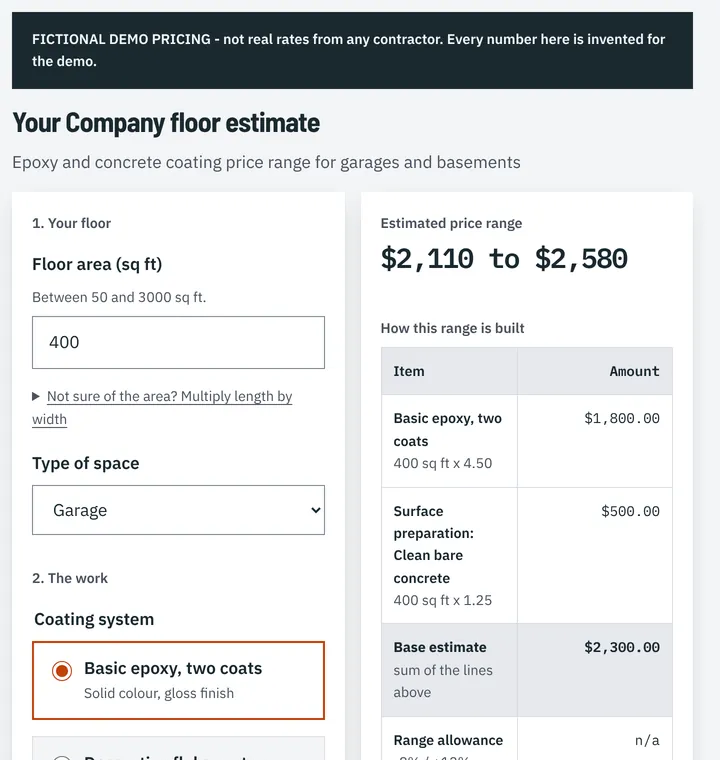
What the visitor sees
- The questions. Floor area, space, coating, surface, cracks and one optional add-on.
- The range. A low and a high figure, rounded outward. Small jobs get your minimum fee.
- The working. Every line, the assumptions, and a plain “not a binding quote” notice.
An enquiry is optional and comes after the range. In the public demo the form is switched off.
The prices in the picture are invented.
How the range is calculated
Add up the parts
Coating and surface prep, each per square foot. Add a space adjustment, crack repair and the add-on.
Widen to a range
Take a lower and upper allowance. Round outward. Raise to your minimum fee if it is lower.
Block bad combinations
An area outside the limits, or an add-on your rules rule out, is refused instead of priced.
Show the working
Every line of the breakdown is listed with its basis, so a homeowner can see how the range was built.
Money is held in whole cents inside the calculator, so totals add up exactly.
Scope and project steps
Prices are not published. Scope and a fixed price are agreed in writing before any work starts. Optional monthly care is agreed separately, in writing first.
Included
- One responsive estimator page or embeddable component
- Up to 5 or 6 configurable inputs and approved estimate ranges
- One lead destination you approve: your email, or a form or CRM endpoint you own
- One brand treatment: your name, logo and colour if supplied
- One revision round, a test checklist and a basic install guide
- 30 days of defect fixes against the agreed spec
Not included unless agreed
- Full website redesign or replacement
- Unlimited pricing models, service categories, locations or languages
- Custom CRM migration, SMS campaigns or complex integrations
- Copywriting for every service page, or ongoing SEO
- Unlimited revisions, ongoing support, uptime guarantees or paid third-party subscriptions
- New features, or pricing changes after you have accepted the work
How a project runs
Check the fit
We check that your work suits an estimator: a repeatable job with prices you can write as rules.
Written scope and fixed price
Deliverables, exclusions, price and acceptance tests in writing. No work starts before that and the agreed first payment.
You send your rules
Pricing rules, minimum job fee, service area, logo and colour, website address, and where enquiries go.
Build and test
Your rules go into a versioned configuration, checked against sample jobs you have priced yourself.
You check it
A preview link and a short checklist. One consolidated round of changes is included.
Go live
Install notes, a test enquiry to your inbox, a handover guide, and 30 days of defect fixes.
More questions
Where do the enquiries go?
To one destination you approve, such as your own inbox or a form account you own. The demo collects nothing.
Will it work on my website?
Usually it can be embedded with an iframe, but some site builders restrict that. The embedding guide lists the caveats.
Can you do it for another trade?
Possibly. Epoxy and concrete coatings are the first niche being tested. Other repeatable jobs, such as fencing or driveway sealing, may fit if the pricing can be written as rules.
Who are you?
Raian Mehrak Noor, a solo builder. I also run Mr. Radiant for web and marketing work and MonsiTools for calculators. The footer has links.
What you can change
- Rates, multipliers, flat allowances and the minimum job fee.
- The range allowance and the rounding step.
- Option names, notes, assumptions, exclusions and the disclaimer.
- Name, one accent colour and a starting area, passed in the page address for previews.
Those address settings are checked against a strict allowlist. They can never change prices or where an enquiry goes.
Each set of rules has a version, shown under the result. The demo’s is demo-epoxy-2026-10-v1.
Limits worth knowing
The rules can be read. They load in the visitor’s browser, so anyone can view them. If your margins must stay private, this is the wrong fit.
- It prices standard jobs. Unusual spaces still need a person to look.
- The range is only as good as the rules you approve.
- A live build sends enquiries to one place only, written into the agreed scope.
- Embedding depends on your platform. See the embedding guide.
Ready to see it work?